Workflow Setup
The Workflow Setup module in DocView Web provides a centralized management interface for creating, organizing, and maintaining all automated business processes within the system. This powerful tool allows administrators to design, configure, and monitor workflows that streamline document processing, task automation, and business operations.
Workflows help automate repetitive tasks, enforce business rules, and ensure consistent processing of documents and data across your organization.
Navigation
To access the Workflow Setup module:
Open the Sidebar Menu
Click on the ☰ Sidebar Icon at the top-left corner of the interface to expand the navigation panel.Select "Workflow"
From the sidebar menu, click on Workflow to reveal the workflow management sub-items.Click on "Workflow Setup"
Select Workflow Setup from the workflow sub-menu to open the main workflow management dashboard.
Workflow Setup Overview
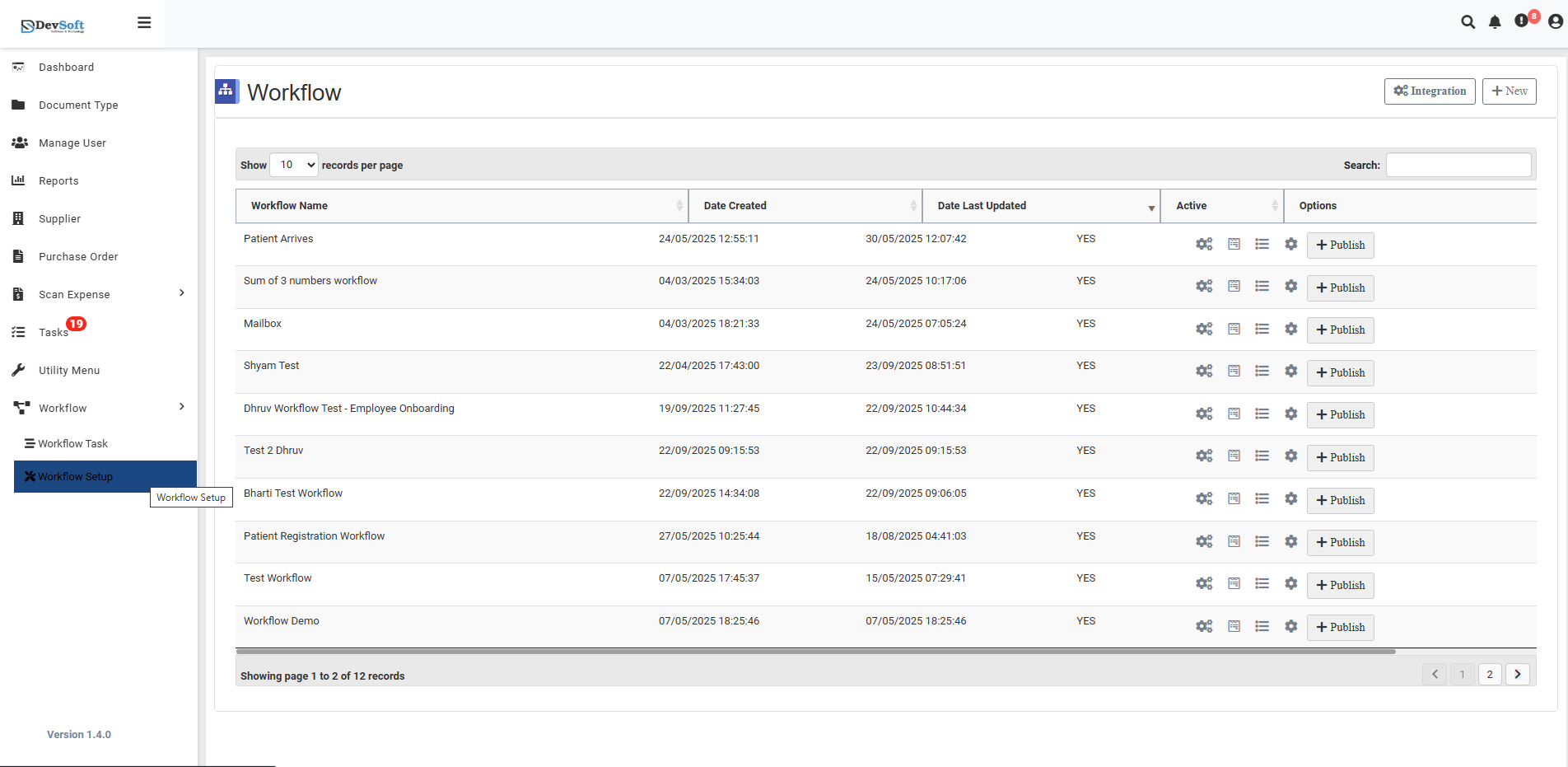
The Workflow Setup screen displays a comprehensive list of all configured workflows in the system, providing administrators with complete visibility and control over business process automation.
Display Controls
At the top of the interface, you can configure how workflows are displayed:
- Show - Set the number of workflows to display per page (default: 10)
- Timing Display - View performance metrics like "7 seconds per page" for workflow execution monitoring
Workflow Management Grid
The main section features a detailed table showing all available workflows with the following columns:
- Workflow Name - The descriptive name of each workflow process
- Date Created - When the workflow was initially configured
- Date Last Updated - The most recent modification date
- Active - Status indicator showing whether the workflow is currently enabled (YES/NO)
- Options - Action menu for each workflow featuring the + Publica button for publishing and distribution
Search Functionality
The Search feature at the bottom allows quick filtering and location of specific workflows by name, making it easy to manage large collections of business processes.
Key Features
Workflow Status Management
- Active/Inactive Toggle - Easily enable or disable workflows without deletion
- Version Control - Track creation and modification dates for audit purposes
- Quick Publishing - Use the + Publica option to deploy workflows to users
Organizational
- Centralized Management - All workflows accessible from a single interface
- Process Visibility - Clear overview of automation status and performance
- Rapid Deployment - Quick publishing and activation of business processes
- Historical Tracking - Complete audit trail of workflow modifications
Administrative Controls
- Bulk Operations - Manage multiple workflows simultaneously
- Status Monitoring - Real-time visibility into workflow activity states
- Access Control - Configure permissions for workflow modification and execution