Doc Verification
The Doc Verification Module in DocView Web provides a comprehensive platform for verifying and validating documents, particularly invoices and supplier documents. This module enables teams to efficiently review, approve, and track document verification status with detailed audit trails and integrated PDF viewing capabilities.
Navigation
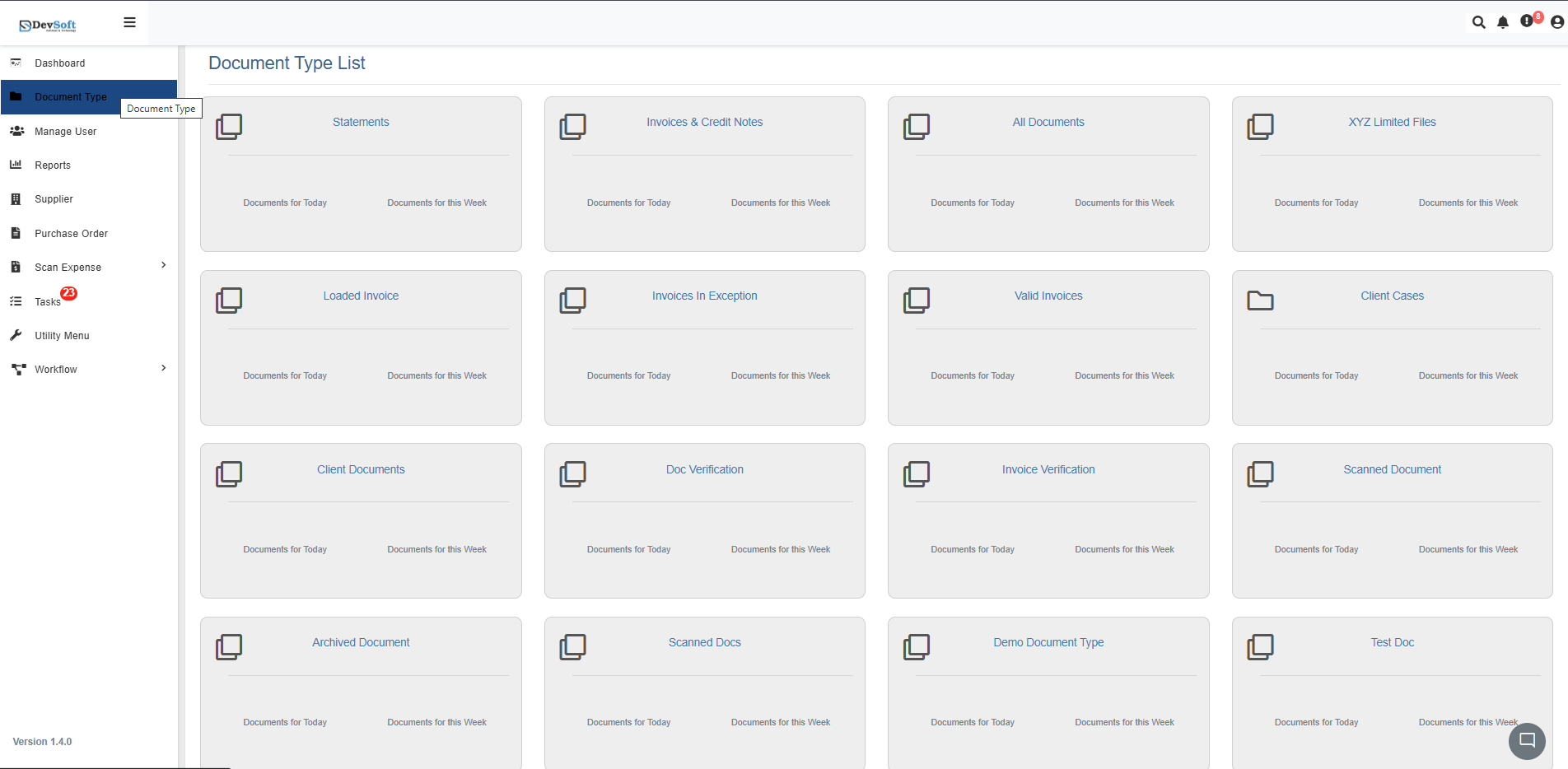
To access the Doc Verification module in DocView Web:
Open the Sidebar Menu
Click the Sidebar Icon (☰) on the left-hand side to expand the navigation panel.Select "Document Type"
Within the sidebar, click on Document Type to open the list of all document categories.Choose "Doc Verification"
From the list, click on Doc Verification. The system will load all documents requiring verification in an organized interface.
Doc Verification Overview
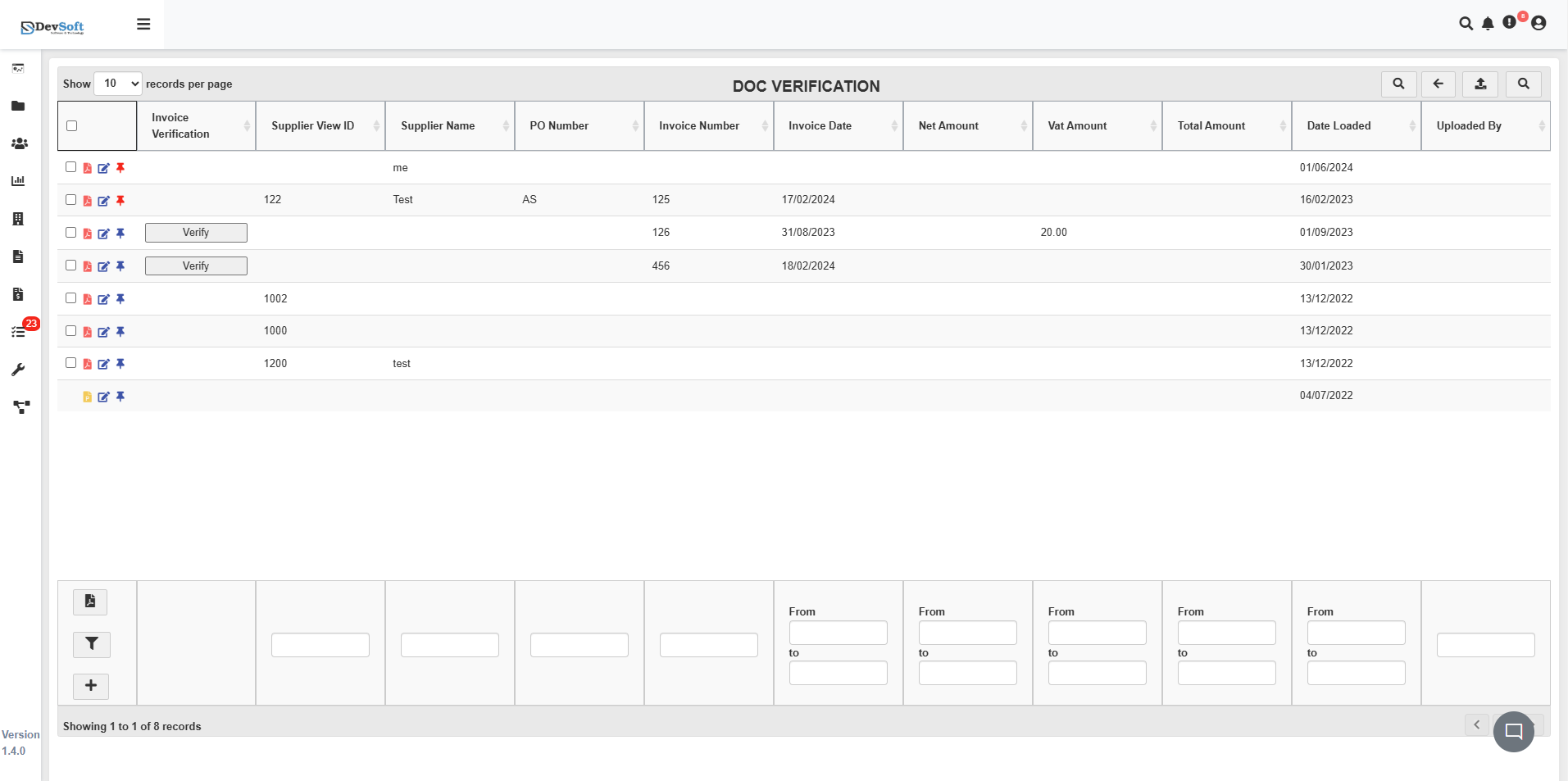
The Doc Verification interface displays all documents requiring verification in a structured table format with comprehensive verification status and document metadata.
Document Grid Structure
The main grid displays verification documents with the following key information:
- Name - Document identifier or reference name
- Invoice Verification - Verification status (Yes/No/Blank)
- Supplier View ID - Unique supplier identifier
- Supplier Name - Name of the supplier/vendor
- PO Number - Purchase Order reference number
- Invoice Number - Supplier invoice number
- Invoice Date - Original invoice date
- Net Account - Base amount before adjustments
- Vat Amount - VAT/tax amount (corrected from Var Amount)
- Total Amount - Final calculated amount
- Date Loaded - Timestamp when document was uploaded
- Uploaded By - User who uploaded the document
Top Toolbar
At the top of the screen, the toolbar provides quick navigation and control tools:
- Records per Page Dropdown – Choose how many results to display (for example, 10, 25, or 50 records).
- Search Icon (🔍) – Instantly search for any record using keywords such as an account number, invoice number, or customer name.
- Back Arrow (⬅️) – Navigate back to the previous screen or main document type list.
- Upload Icon (⬆️) – Upload new documents directly in supported formats like PDF, Excel, or image files.
- Search Panel (🗂️) – Opens a dedicated panel that allows filtering by account, invoice, date, amount, document type, and other criteria for precise results.
These features help users manage large data volumes smoothly and keep the list updated in real time.
Search Panel
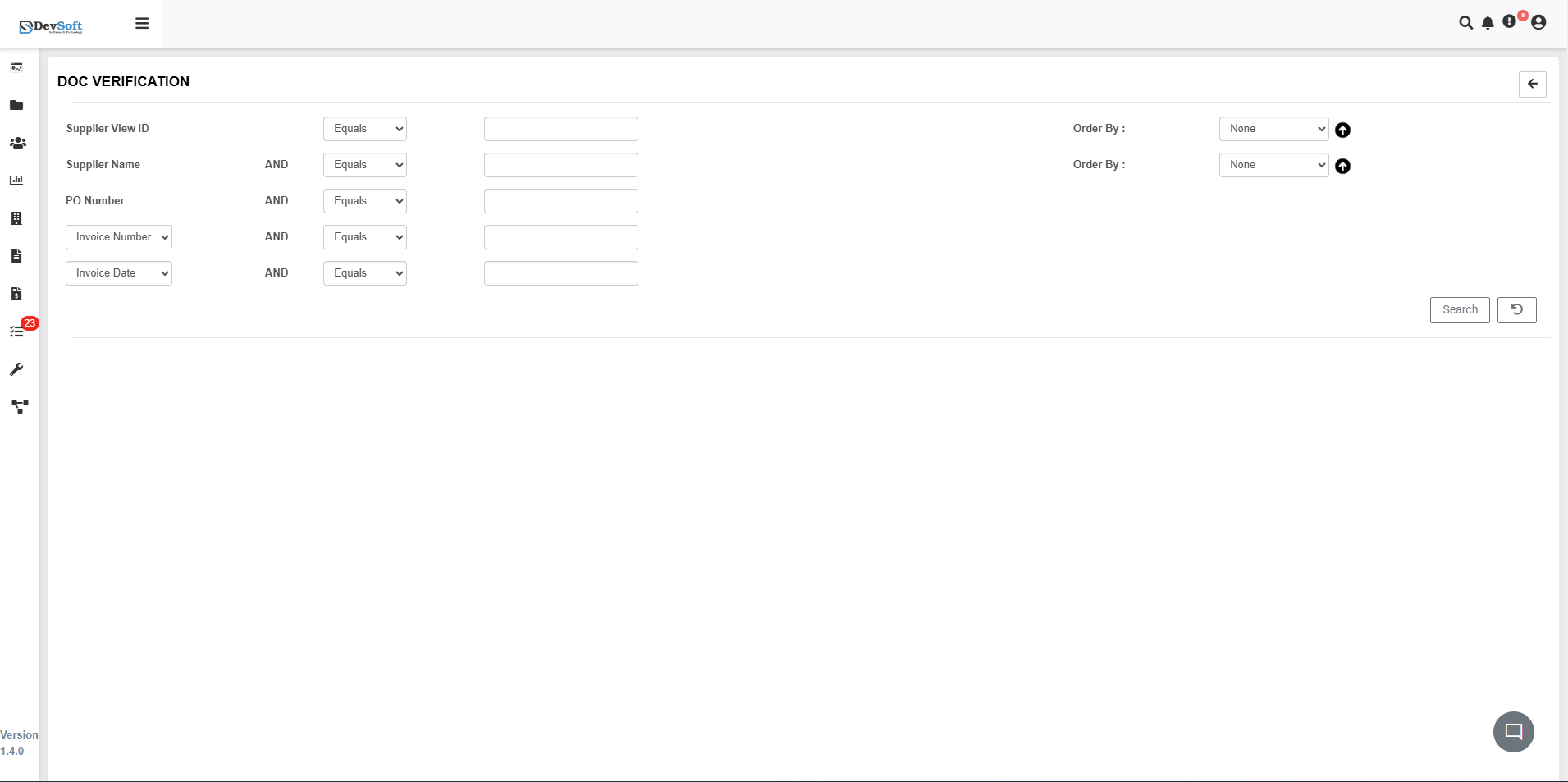
Clicking the Search Panel icon (🗂️) in the top toolbar reveals advanced search and filtering options for verification documents:
Search Criteria
The search panel provides a comprehensive form with multiple filtering options:
- Supplier ID - Filter by unique supplier identifier
- Supplier Name - Search by vendor or supplier company name
- PO Number - Filter by purchase order reference numbers
- Invoice Number - Search using specific invoice references
- Invoice Date - Filter by date ranges or specific invoice dates
- Order By - Primary sorting field for results
- Order By - Secondary sorting criteria
Bottom Icons
- Search Button - Execute the search query and display matching documents
- Back/Reset Icon - Clear all search criteria and return to default view
Action Controls
Each document record includes interactive icons for verification management:
- 📄 PDF View – Open and review the document in the integrated PDF viewer
- ✅ Verify – Launch the comprehensive document verification workflow
- ✏️ Edit – Modify document metadata and verification details
- 📌 Pin – Mark important documents for priority attention
PDF Document View
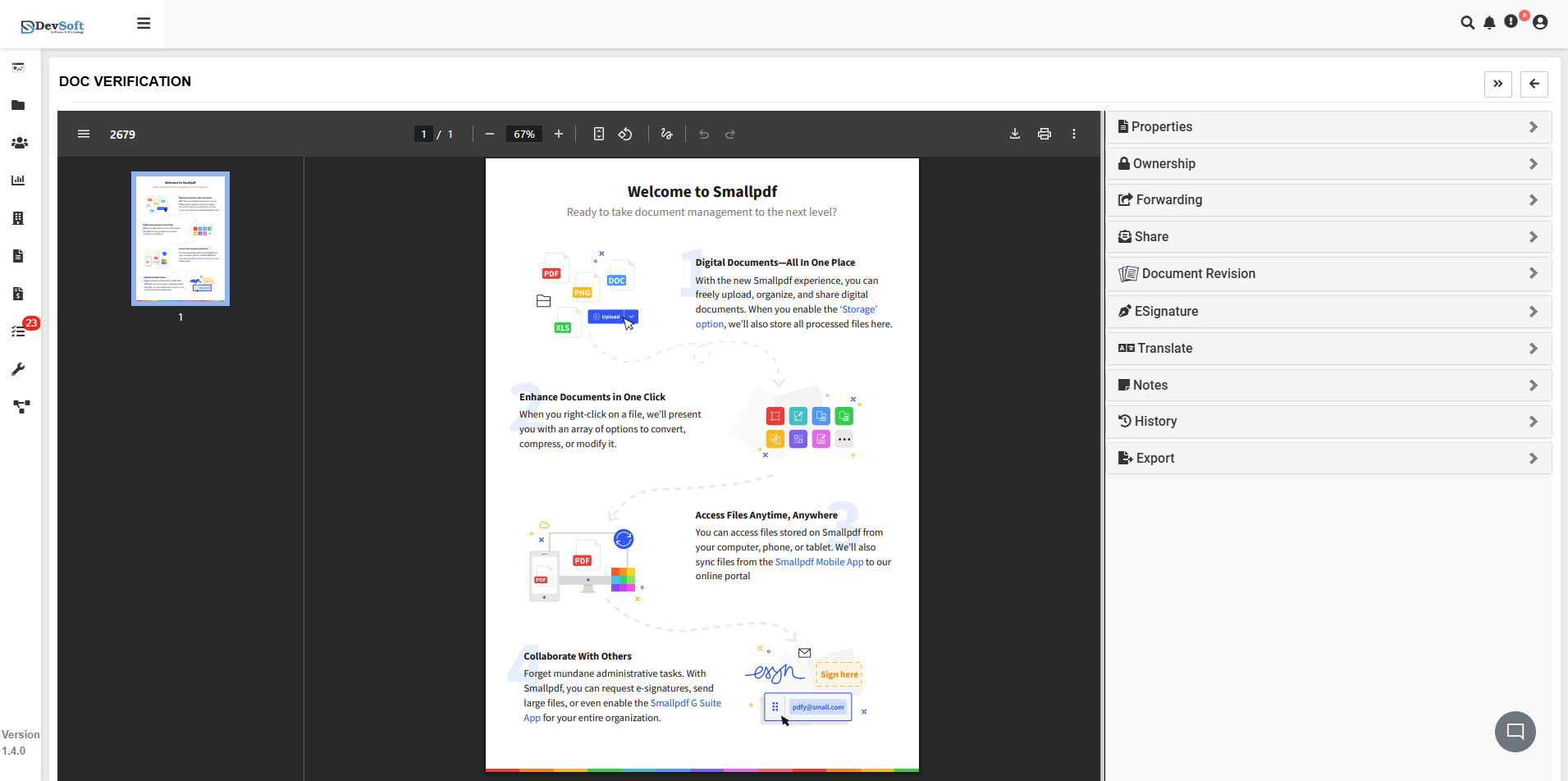
Clicking the PDF View icon opens the document in the integrated PDF viewer with comprehensive document management tools and properties.
Document Viewer Features
- Smallpdf Integration - Advanced PDF viewing and manipulation capabilities
- Digital Document Management - Upload, organize, and share digital documents
- Document Conversion - Convert files between different formats
- Cross-platform Access - Access documents from computer, phone, or tablet
- Collaboration Tools - E-signatures and document sharing features
Document Properties Panel
The left sidebar provides comprehensive document management options:
- B Properties - Basic document properties and metadata
- A Ownership - Document ownership settings and permissions
- D Forwarding - Document forwarding and distribution options
- S Share - Document sharing and collaboration features
- Document Revision - Version control and revision history tracking
- E Signature - Electronic signature capabilities for approvals
- Translate - Document translation tools
- Notes - Add and manage document annotations
- History - Complete audit trail of document actions
- Export - Download and export document options
Document Verify
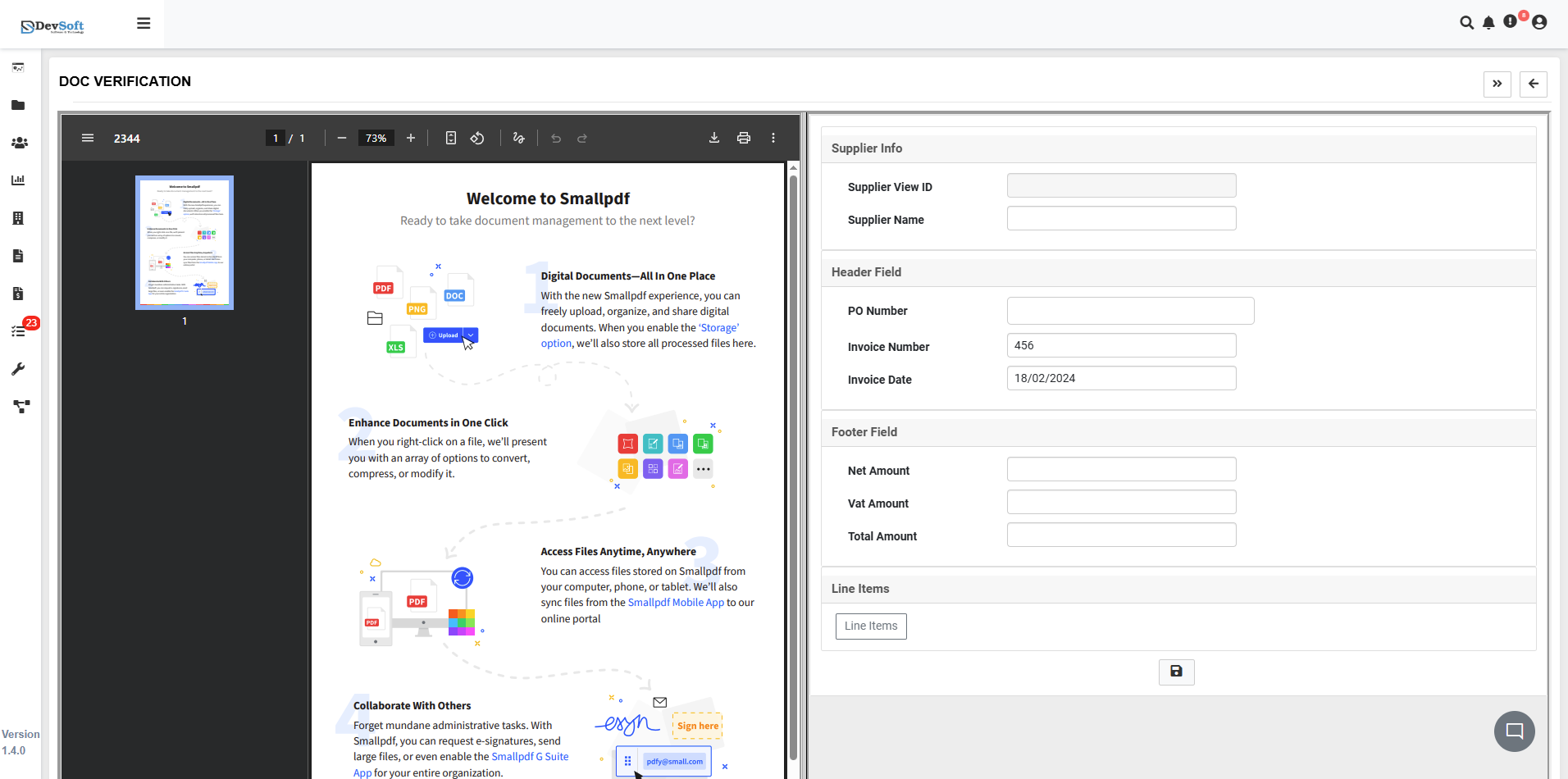
Clicking the Verify icon opens the comprehensive document verification interface with integrated PDF viewing and detailed supplier information.
PDF Viewer Features
- Smallpdf Integration - Advanced PDF manipulation and viewing capabilities
- Document Tools - Convert, compress, and modify documents
- Cross-platform Access - Access verification documents from any device
- Collaboration Features - E-signatures and document sharing
Supplier Information Panel
The right panel displays comprehensive supplier and invoice details for verification:
Supplier Details
- Supplier View ID - Unique supplier identifier
- Supplier Name - Vendor company name
- Header Field - Document header information
Header Field
- PO Number - Purchase Order reference (e.g., 456)
- Invoice Number - Supplier invoice reference
- Invoice Date - Invoice issue date (e.g., 10/02/2024)
Footer Field
- Net Amount - Base invoice amount
- Vat Amount - VAT/tax amount (corrected)
- Total Amount - Final invoice total
Line Items
- Detailed Breakdown - Itemized list of products/services with descriptions
- Quantity Information - Number of units for each line item
- Pricing Details - Unit prices and extended amounts for each item
- Tax Calculations - VAT/tax breakdown per line item where applicable
Verification Submission
After reviewing all line items and verifying the document details:
- Submit Button - Finalizes the verification process and updates document status
Key Features
Comprehensive Verification Workflow
- Status Tracking - Clear indicators of verification progress
- Multi-level Approval - Structured verification hierarchy
- Audit Trail - Complete history of verification actions
- Version Control - Track system updates and improvements
Supplier Document Management
- Supplier Integration - Comprehensive supplier information
- PO Matching - Purchase order verification capabilities
- Invoice Validation - Financial amount verification
- Document Correlation - Link related documents and references
Advanced Verification Tools
- PDF Integration - Direct document viewing and annotation
- Financial Validation - Amount verification and calculations
- Supplier Verification - Vendor credential validation
- Bulk Verification - Process multiple documents simultaneously
Compliance & Security
- Audit Compliance - Complete verification trail for audits
- User Accountability - Track who verified each document
- Data Integrity - Ensure accurate financial records
- Security Controls - Role-based verification permissions
Workflow Integration
The Doc Verification module seamlessly integrates with:
- Accounts Payable Systems for payment processing
- Supplier Management for vendor validation
- Financial Systems for accounting reconciliation
- Compliance Frameworks for regulatory requirements
This module ensures efficient document verification while maintaining accurate, auditable records for all financial documents and supplier interactions.