Financial Reports
Financial Reports in DocView Web give a detailed view of all financial activities, including invoices, credit notes, transaction tracking, and VAT information.
This module is designed for accounting teams and managers to monitor financial operations efficiently.
Navigation
Login to DocView Web
Enter your registered credentials to access the system dashboard.Open the Sidebar Menu
Click the ☰ Sidebar Icon at the top-left to expand the main navigation.Select "Reports"
From the sidebar, click Reports to open the Reports Dashboard.Choose "Financial Reports"
Click on Financial Reports to access detailed financial data, including invoices, credit notes, and other transaction records.
The navigation ensures quick access to financial insights and reporting tools.
Financial Reports Overview
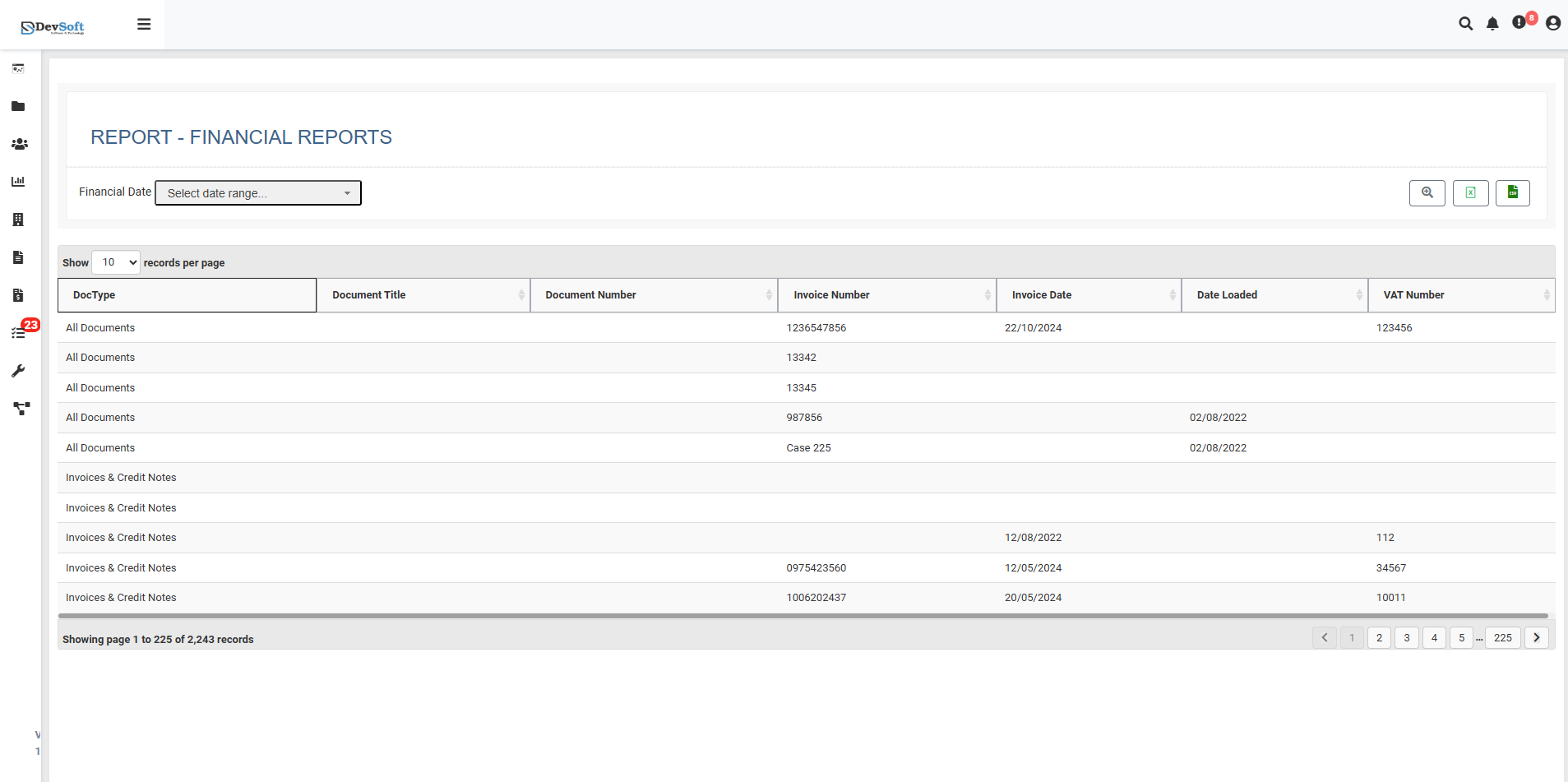
The Financial Reports interface is structured for easy review and analysis:
- Header: Shows "REPORT - FINANCIAL REPORTS".
- Financial Date Filter: Users can select a specific period for report generation.
- Control Panel: Includes records per page selector, pagination controls, and a summary of displayed results (e.g., “Showing page 1 to 225 records”).
- Data Table: Lists all financial documents with sortable and filterable columns.
Data Columns
Key columns displayed include:
- Document Type (Dec/Tips): Classification such as Invoice, Credit Note, etc.
- Document Title: The name or description of the financial document.
- Document Number: Unique identifier for the document.
- Transaction Reference (Imotion Number): Internal tracking number.
- Transaction Date (Imotion Date): Date of the financial event.
- Data Load Timestamp (Data Loaked): When the document was processed in the system.
- VAT Number: Tax identification number for financial documents.
Action Icons
Located on the top-right corner of the report interface:
- 🔍 Search: Quickly find financial records by keywords or filters.
- 📊 Excel: Export selected or filtered financial data to an Excel spreadsheet.
- 📑 CSV: Download selected financial data in CSV format for external analysis.
These tools provide flexible ways to analyze, filter, and export financial information efficiently.