Scanned Document
The Scanned Document Module in DocView Web provides a comprehensive platform for managing and tracking all types of scanned documents across various departments. This module enables efficient document categorization, status tracking, and SLA management for scanned correspondence, invoices, complaints, and other document types.
Navigation
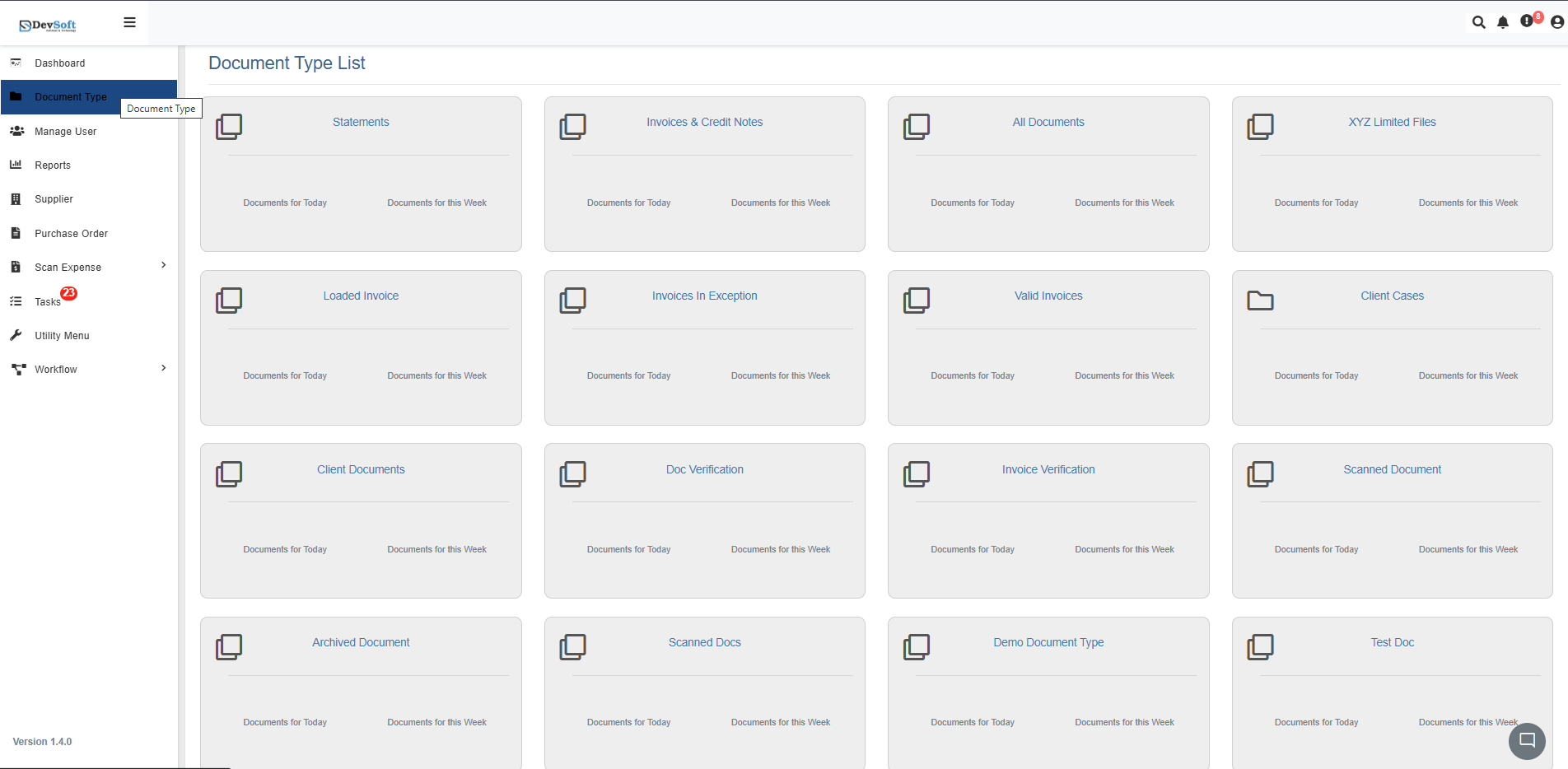
To access the Scanned Document module in DocView Web:
Open the Sidebar Menu
Click the Sidebar Icon (☰) on the left-hand side to expand the navigation panel.Select "Document Type"
Within the sidebar, click on Document Type to open the list of all document categories.Choose "Scanned Document"
From the list, click on Scanned Document. The system will load all scanned document records in an organized interface.
Scanned Document Overview
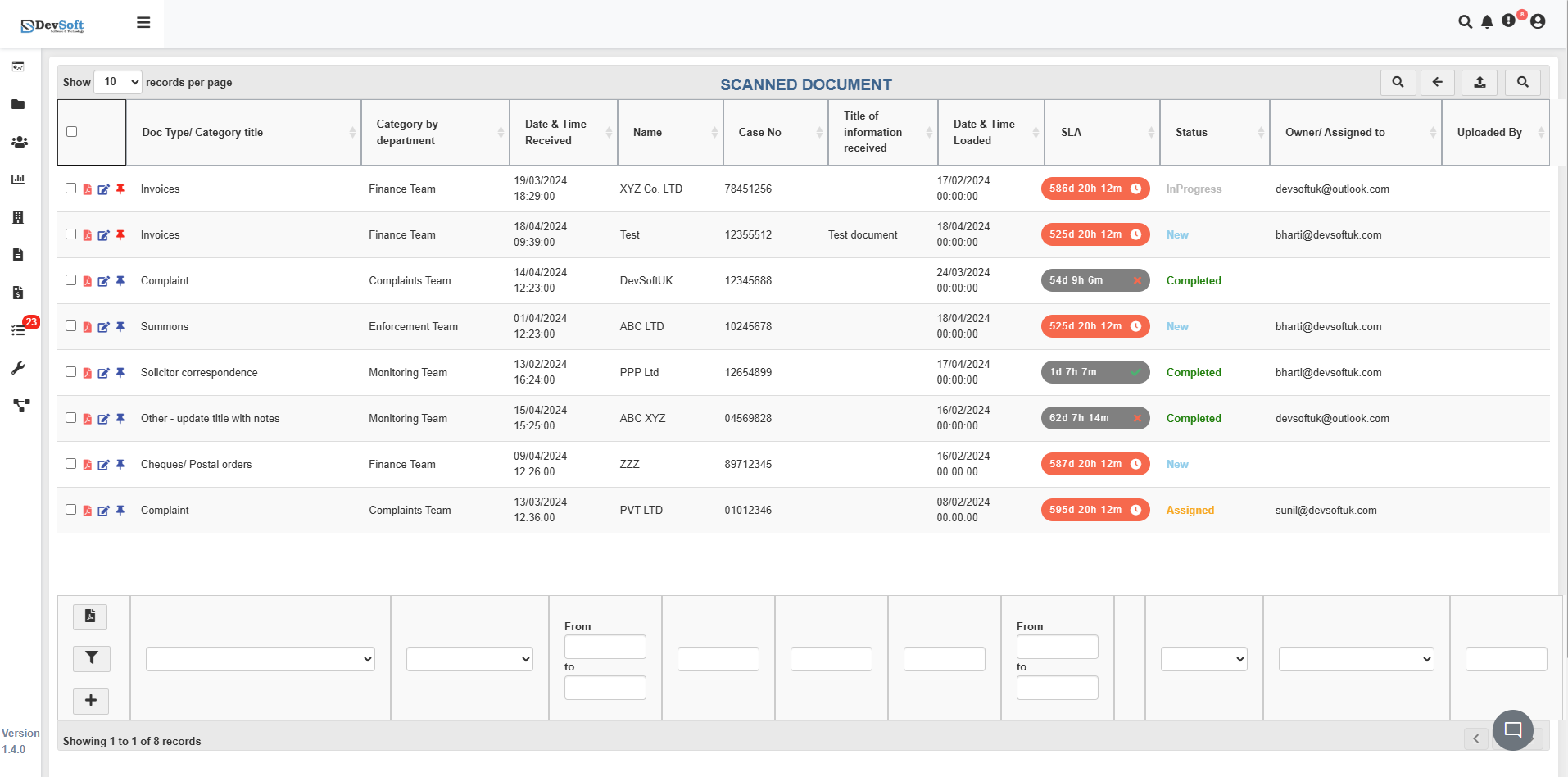
The Scanned Document interface displays all scanned documents in a comprehensive table format with detailed metadata, department categorization, and status tracking.
Document Grid Structure
The main grid displays scanned documents with the following key information:
- Description - Type of document (Invoice, Complaint, Summons, Correspondence, etc.)
- Category by department - Department responsible (Finance Team, Complaints Team, Enforcement Team, Monitoring Team)
- Date & Time Received - Timestamp when document was received
- Name - Company or individual name (XYZ Co. LTD, Test, ABC LTD, etc.)
- Case No. - Unique case reference number
- Title of Information received - Document title or description
- Date & Time Loaded - Timestamp when document was uploaded to system
- SLA - Service Level Agreement timeframe (e.g., 8:30 pm T/m)
- Status - Current status (New, Completed, Analysed, etc.)
- Owner/Assigned to - Team member responsible for the document
- Uploaded By - User who uploaded the scanned document
Document Types & Categories
The system supports various document types including:
- Invoices - Financial documents processed by Finance Team
- Complaints - Customer complaints handled by Complaints Team
- Summons - Legal documents managed by Enforcement Team
- Correspondence - General communications
- Cheques/Postal orders - Payment documents
Record Management
- Pagination Display - Shows current view range and total records (e.g., "Showing 1 to 1 of 3 records")
- Status Tracking - Multiple status levels (New, Completed, Analysed)
- SLA Monitoring - Service level agreement tracking for timely processing
- Department Assignment - Clear categorization by responsible teams
Top Toolbar
At the top of the screen, the toolbar provides quick navigation and control tools:
- Records per Page Dropdown – Choose how many results to display (for example, 10, 25, or 50 records).
- Search Icon (🔍) – Instantly search for any record using keywords such as case number, company name, or document description.
- Back Arrow (⬅️) – Navigate back to the previous screen or main document type list.
- Upload Icon (⬆️) – Upload new scanned documents directly in supported formats.
- Search Panel (🔍) – Opens a dedicated panel for advanced filtering and search criteria.
These features help users manage large volumes of scanned documents efficiently.
Search Panel
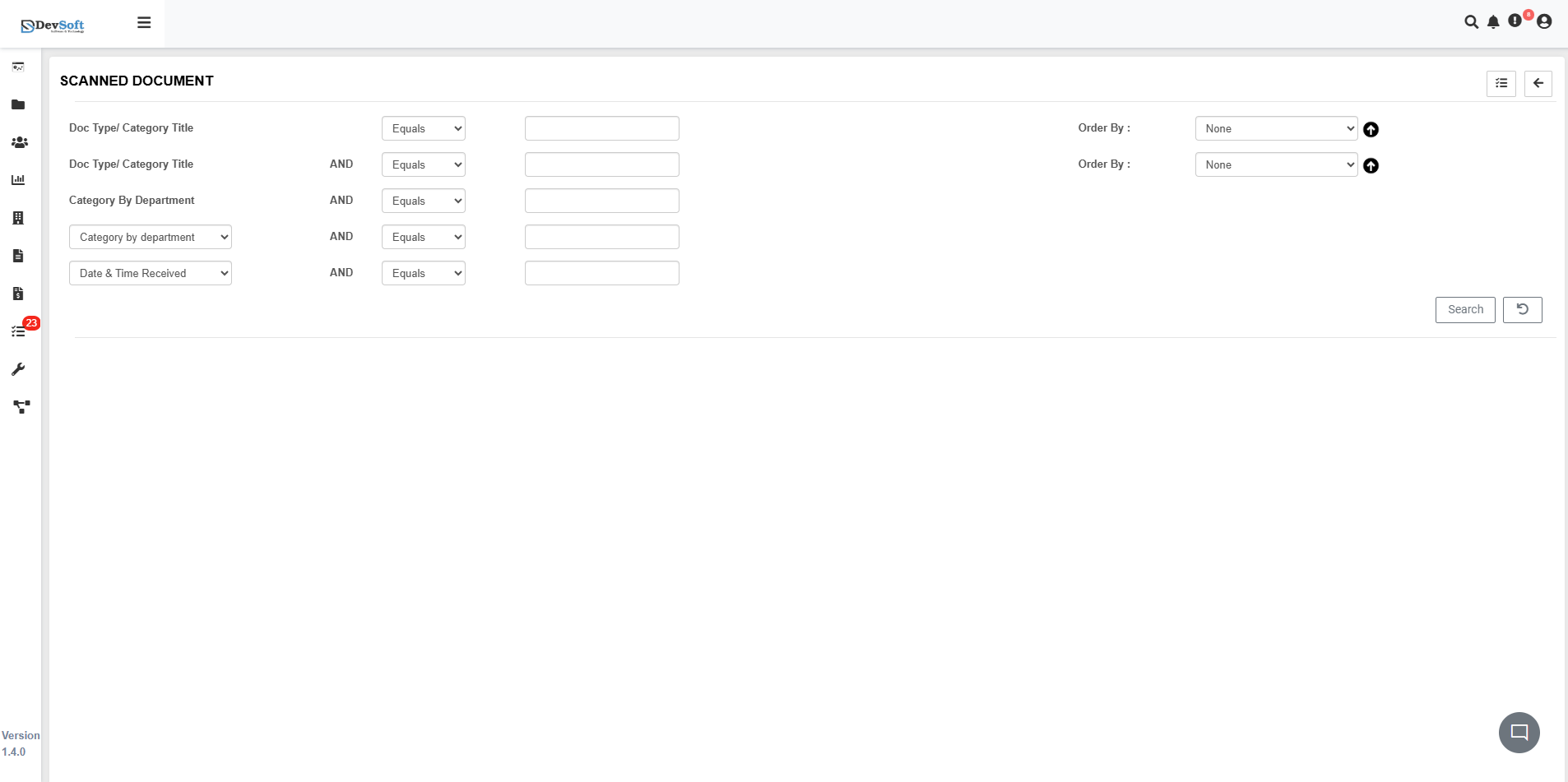
Clicking the Search Panel icon (🔍) in the top toolbar reveals advanced search and filtering options for scanned documents:
Search Criteria
The search panel provides comprehensive filtering options:
- Doc Type/Category Title - Filter by document type and category
- Category By Department - Search by responsible department
- Date & Time Received - Filter by receipt date ranges
- Multiple Filter Conditions - Combine criteria using AND conditions for precise results
Search Interface Features
- Multiple Filter Options - Combine various search criteria
- Department-based Filtering - Filter by specific teams (Finance, Complaints, Enforcement, Monitoring)
- Document Type Categorization - Search by specific document types
- Date Range Filtering - Narrow results by specific time periods
Version Information
- System Version - Displays current module version (Version 1.4.0)
Action Controls
Each scanned document record includes interactive icons for document management:
- 📄 PDF View – Open and review the scanned document in integrated PDF viewer
- ✏️ Edit – Modify document details, status, or assignment information
- 📌 Pin – Mark important scanned documents for priority attention
PDF Document View
Clicking the PDF View icon opens the scanned document in the integrated PDF viewer with comprehensive document management tools.
Document Viewer Features
- Integrated PDF Viewer - High-quality display of scanned documents
- Zoom and Navigation - Adjust view scale and navigate multi-page documents
- Document Inspection - Detailed examination of scanned content
- Cross-platform Compatibility - Access scanned documents from any device
Document Properties Panel
The left sidebar provides comprehensive document management options:
- Document Properties - Basic document metadata and information
- Ownership Settings - Document ownership and access permissions
- Forwarding Options - Document distribution and routing
- Sharing Features - Collaboration and sharing capabilities
- Document Revision - Version control and change history
- Electronic Signature - Digital signature capabilities
- Translation Tools - Document translation features
- Annotation Features - Add notes and comments
- Action History - Complete audit trail of document processing
- Export Options - Download and export capabilities
Key Features
Comprehensive Document Management
- Multi-department Support - Categorization across Finance, Complaints, Enforcement, and Monitoring teams
- Status Tracking - Real-time status updates (New, Completed, Analysed)
- SLA Monitoring - Service level agreement tracking for timely processing
- Assignment Workflow - Clear ownership and responsibility tracking
Advanced Categorization
- Document Type Classification - Automatic categorization of different document types
- Department Routing - Intelligent routing to appropriate teams
- Case Number System - Unique identification for tracking and reference
- Timestamp Tracking - Complete audit trail of receipt and processing times
Workflow Automation
- Automated Assignment - Intelligent routing to appropriate team members
- Status Progression - Streamlined workflow from receipt to completion
- SLA Alerts - Notifications for approaching deadlines
- Bulk Operations - Process multiple documents simultaneously
Compliance & Security
- Audit Trail - Complete history of document processing actions
- Access Controls - Role-based permissions for different departments
- Data Integrity - Secure storage and tracking of sensitive documents
- Compliance Reporting - Generate reports for regulatory requirements
Workflow Integration
The Scanned Document module seamlessly integrates with:
- Departmental Workflows for efficient document routing
- Compliance Systems for regulatory document management
- Case Management for tracking document-related cases
- Customer Service for complaint and correspondence handling
- Financial Systems for invoice and payment processing
This module ensures efficient scanned document management while maintaining organized, accessible records for all departmental workflows and compliance requirements.