Client Documents
The Client Documents Module in DocView Web provides a comprehensive document management system for organizing, viewing, and managing all client-related documents. This module enables efficient tracking of client documentation with detailed metadata and seamless PDF integration.
Navigation
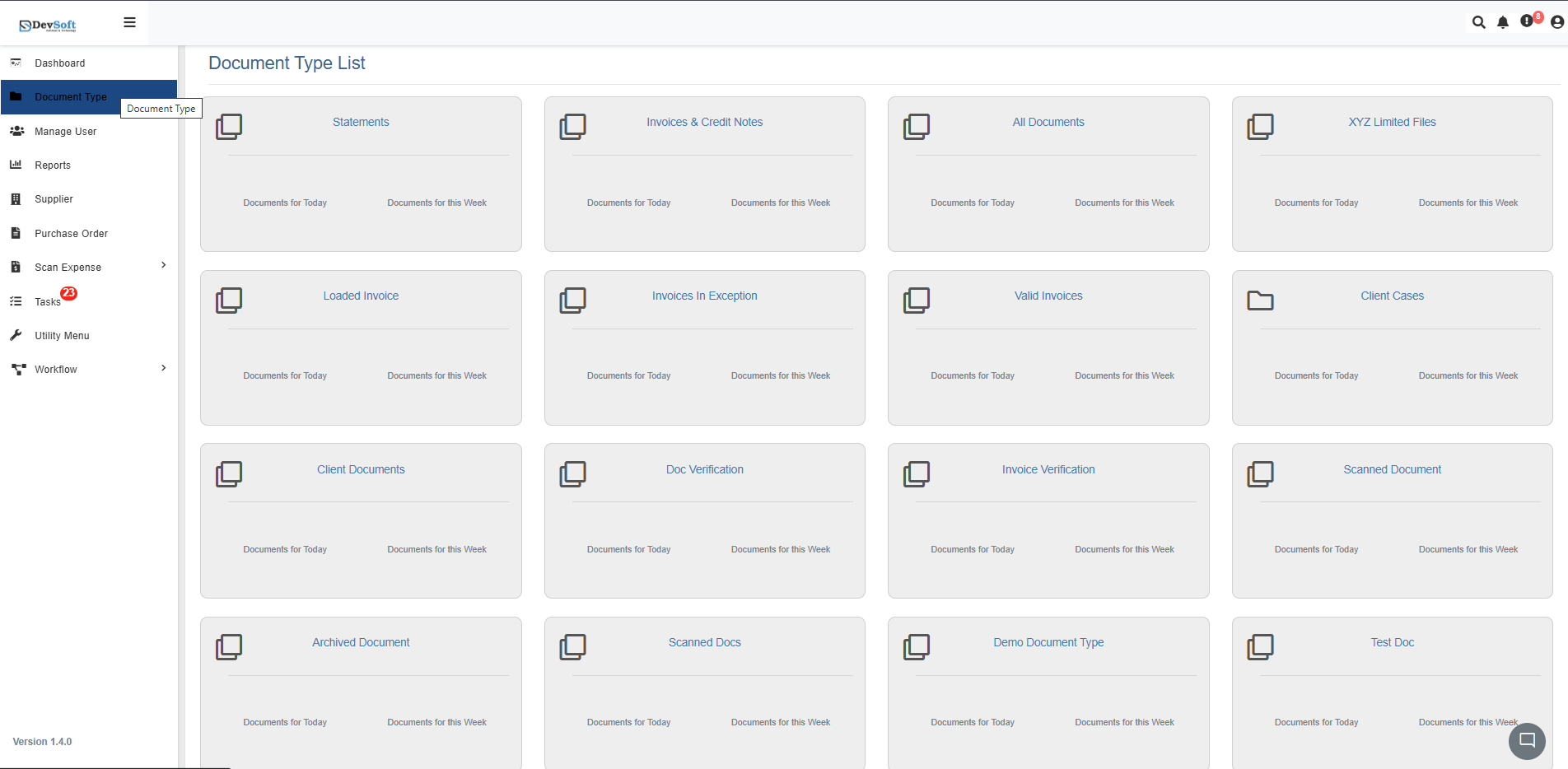
To access the Client Documents module in DocView Web:
Open the Sidebar Menu
Click the Sidebar Icon (☰) on the left-hand side to expand the navigation panel.Select "Document Type"
Within the sidebar, click on Document Type to open the list of all document categories.Choose "Client Documents"
From the list, click on Client Documents. The system will load all client document records in an organized interface.
Client Documents Overview
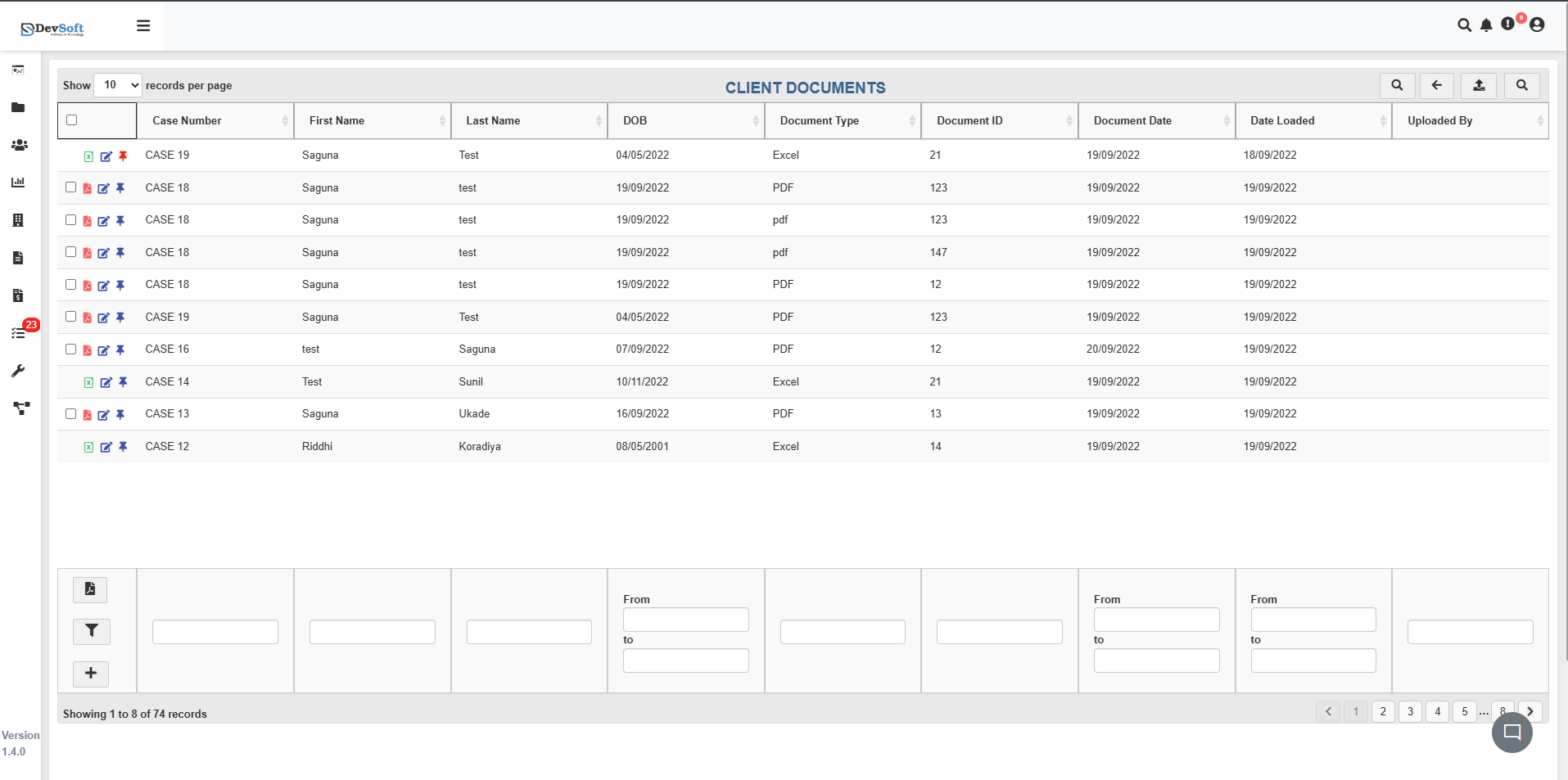
The Client Documents interface displays all client documents in a structured table format with comprehensive document metadata and pagination controls.
Document Grid Structure
The main grid displays client documents with the following key information:
- Case Number - Case classification and reference number (e.g., CASE 19, CASE 16)
- First Name - Client's first name
- Last Name - Client's last name
- DOB - Client's date of birth
- Document Type - File format (PDF, Excel, etc.)
- Document ID - Unique identifier for each document
- Document Date - Original document creation date
- Date Loaded - Timestamp when document was uploaded to DocView
- Updated By - User who last modified the document record
Pagination & Record Management
- Record Count Display - Shows current view range and total records (e.g., "1 to 5 of 74 records")
- Warning Indicators - Visual alerts for documents requiring attention
- Navigation Controls - Browse through multiple pages of documents
Action Controls
Each document record includes interactive icons for document management:
- 📄 PDF View - Open and review the document in integrated PDF viewer
- ✏️ Edit - Modify document metadata or properties
- 📌 Pin - Mark important documents for quick access
PDF Document View
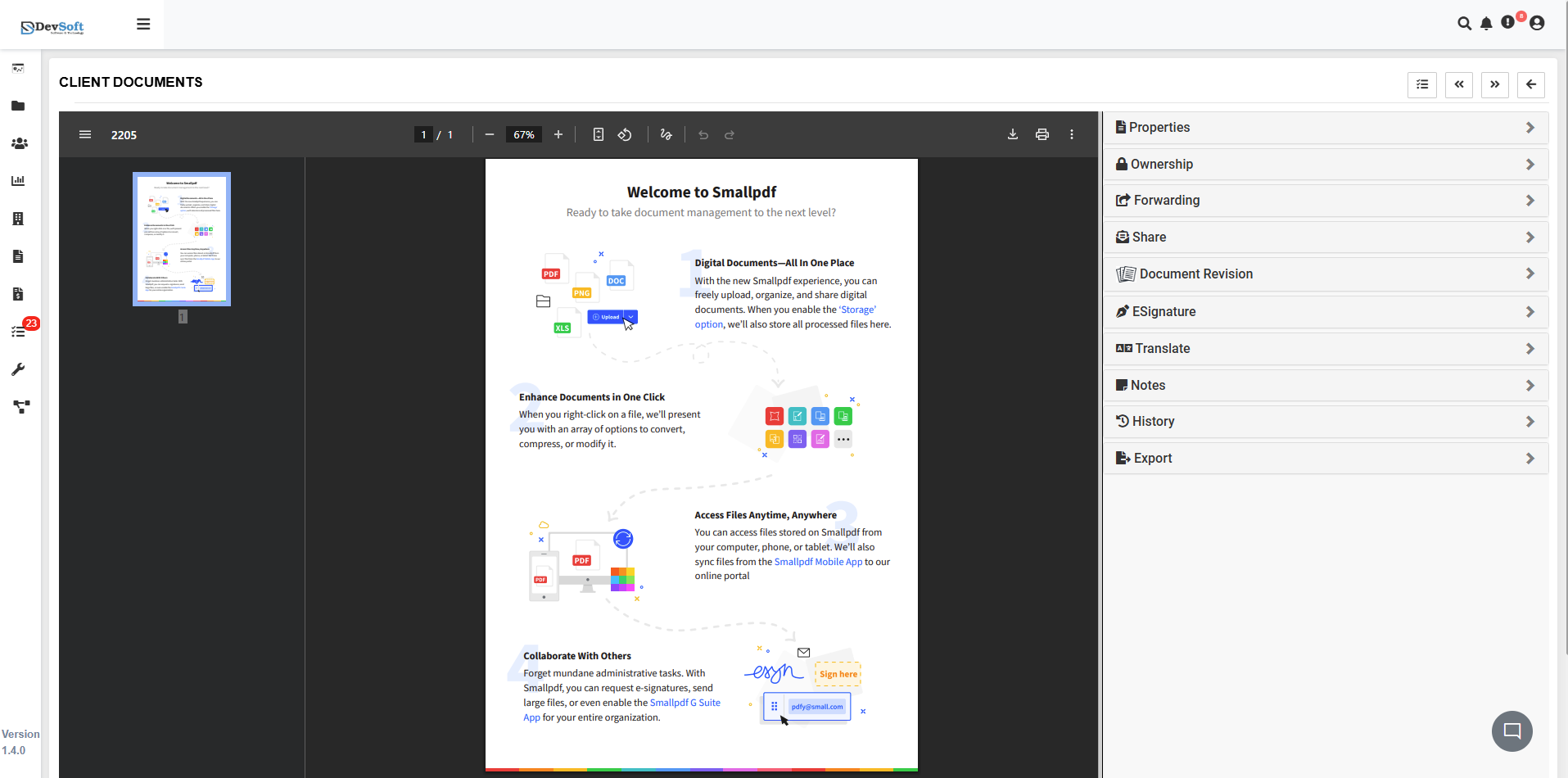
Clicking the PDF View icon opens the document with comprehensive viewing tools and property information.
Document Viewer Features
- Integrated PDF Viewer - Review documents directly in the browser
- Smallpdf Integration - Advanced PDF manipulation capabilities
- Document Tools - Convert, compress, and modify documents
- Multi-platform Access - Access documents from computer, phone, or tablet
Right Panel - Document Properties
The properties panel displays comprehensive document metadata:
- Case Number - Associated case reference
- First Name - Client first name
- Last Name - Client last name
- DOB - Client date of birth
- Document Type - File format (PDF, Excel)
- Document ID - Unique document identifier
- Document Date - Original document date
- Date Loaded - Upload timestamp
- Uploaded By - User who uploaded the document
Property Management
- Ownership - Document ownership settings
- Forwarding - Document forwarding options
- Share - Sharing and collaboration features
- Document Revision - Version control and revision history
Document Actions
- Signature - Electronic signature capabilities
- Translate - Document translation tools
- Notes - Add and manage document annotations
- History - Complete audit trail of document actions
- Export - Download and export options
Smallpdf Integration Features
- Document Conversion - Convert between various formats
- Compression Tools - Reduce file size while maintaining quality
- Digital Workflows - Signature requests and form filling
- Cross-platform Sync - Access documents across all devices
Top Bar Icons
The top toolbar in the Client Documents module allows users to quickly access essential actions. The Search functionality is the primary entry point:
🔍 Search – Quickly locate a specific document by typing keywords such as client name, case number, or document ID. Real-time results update as you type. \
⬅️ Back – Return to the previous screen or main document list.
⬆️ Upload Document – Add new client documents directly from your device. Supports bulk uploads and multiple file formats (PDF, Excel, Word, Images).
🔍 Search Panel – Opens an advanced filter panel to refine searches using multiple fields, including Case Number, Document Type, Date Loaded, or Client Details.
Tip: The Search icon is the quickest way to find a document, while the Search Panel allows more precise filtering across multiple fields.
Search & Filter Panel
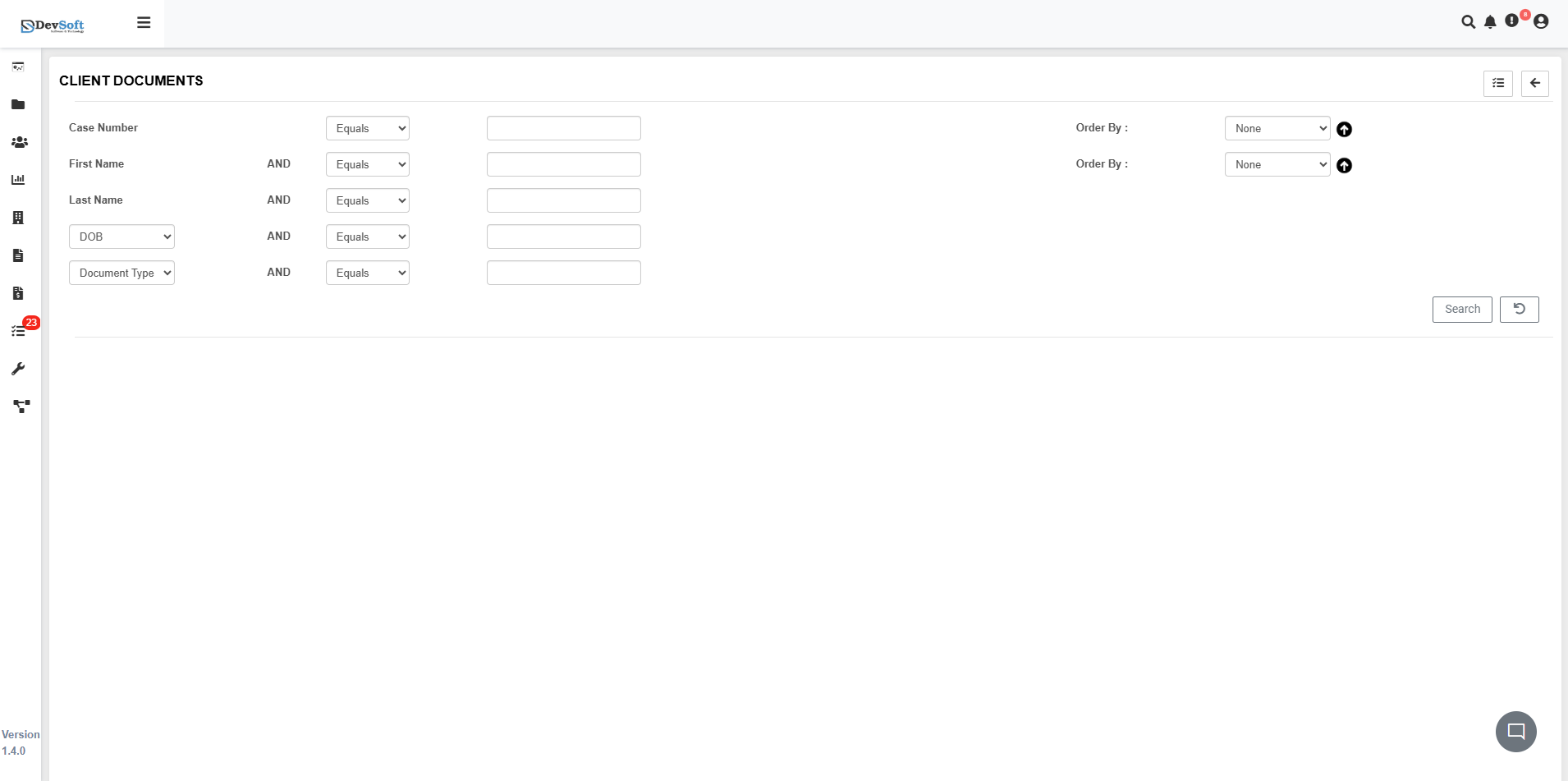
Clicking the Search Panel icon (🔍) in the top right toolbar reveals advanced search and filtering options:
Search Criteria
- Client Information - Search by client name, case number, or DOB
- Document Attributes - Filter by document type, ID, or date ranges
- Upload Details - Search by upload date or user
- Advanced Filters - Combine multiple criteria for precise results
Search Interface Features
- Multiple Filter Options - Combine various search parameters
- Quick Apply - Instant application of search criteria
- Save Searches - Store frequently used search configurations
- Reset Functionality - Clear all filters to start new search
Key Features
Comprehensive Document Tracking
- Detailed Metadata - Complete document information including client details and dates
- Version Control - Track document revisions and changes
- Audit Trail - Complete history of document access and modifications
Advanced Document Management
- Multiple Format Support - Handle PDF, Excel, and other document types
- Bulk Operations - Manage multiple documents simultaneously
- Document Organization - Structured by case numbers and client information
Integration Capabilities
- Smallpdf Integration - Advanced PDF manipulation tools
- Cross-platform Access - Documents accessible from any device
- Collaboration Features - Sharing and electronic signatures
Search & Retrieval
- Advanced Filtering - Multi-criteria search capabilities
- Quick Navigation - Pagination and record counting
- Saved Searches - Store and reuse frequent search patterns
Workflow Integration
The Client Documents module seamlessly integrates with:
- Case Management Systems for organized client documentation
- Document Storage Platforms for secure file management
- Client Portal Systems for client access to documents
- Compliance Frameworks for regulatory document retention
This module ensures efficient client document management while maintaining organized, accessible records for all client interactions and documentation needs.