Edit Workflow Form
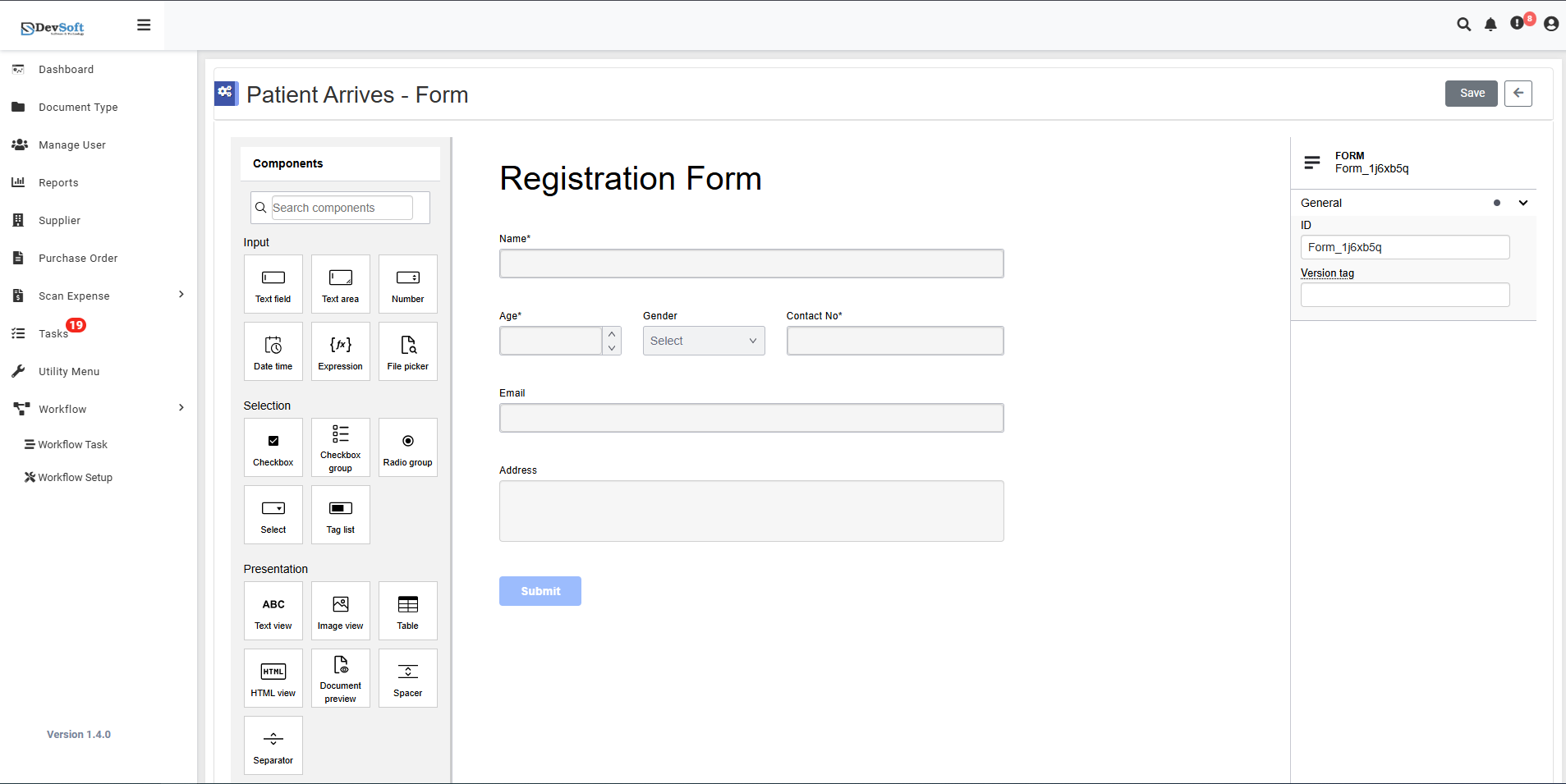
The Edit Workflow Form page allows users to modify existing form configurations, add form components, configure data connections, and customize form presentation for workflow processes.
This comprehensive interface provides detailed control over form structure, data handling, and user interface elements.
Navigation
To access the Edit Workflow Form page:
Navigate to Workflow Forms Management
Access the main Forms screen through the Workflow Setup menu.Locate Target Form
Browse the forms grid to find the specific form you want to modify.Click Edit Icon
Click the edit (pencil) icon on the form record you wish to update.Edit Form Page Opens
The system displays the comprehensive form configuration interface.
Form Configuration Sections
Components Section
Search Components - Browse and add form elements:
- Input - Text input fields
- Text Level - Text formatting and styling
- Test Area - Testing and validation areas
- Number - Numeric input fields
Data Lines Section
Data Connection Configuration:
- Connection - Database and external connections
- File Pillar - File storage and management systems
Selection Section
Form Selection Elements:
- Candidate - Selection options and candidates
- Create New Grade - Grading and rating systems
- Buildp Group - Grouping and categorization
Select Section
List Management:
- Test List - Predefined option lists and dropdown values
Presentation Section
UI and Display Configuration:
- ABC - Basic presentation elements
- Test Name - Field labeling and naming
- Integer Name - Numeric field configurations
- Index - Sorting and indexing options
HTML View Section
Advanced Display Options:
- Document Operator - Document handling operations
- Server - Server-side processing configurations
Form Specific Configurations
Registration Form Example
Field Configuration:
- Name* - Required name field
- User - User association field
- Gender - Gender selection field
- Select - General selection field
- Contact N/A* - Required contact information
Segment Management
Form Section Organization:
- Name* - Segment identification
- User - User permissions and access
- Gender - Data type specifications
- Select - Selection configurations
- Contact N/A* - Required field settings
Code Configuration
Form Code Management
Technical Configuration:
- FOBM - Form object model references
- Form_1jobObj - Job object associations
- General - General form settings
- D - Data handling configurations
- Version Tag - Form version control
Action Buttons
- Save – Save all form configuration changes
- Submit – Submit the form for processing or approval
- Back – Return to Forms Management without saving
Advanced Features
Data Validation
- Required field markers (*) indicate mandatory fields
- Data type validation for different field types
- Cross-field validation rules
Integration Options
- Database connection configurations
- External system integrations
- API endpoint setups
Security Settings
- User access controls
- Data encryption options
- Audit trail configurations
This comprehensive editing interface ensures forms are precisely configured to meet specific workflow requirements while maintaining data integrity and user experience.